

How Orders Work
All orders on Polymarket are limit orders. A limit order specifies the price you’re willing to pay (or accept) and the quantity you want to trade.“Market orders” are simply limit orders with a price set to execute
immediately against the best available resting orders.
Order Types
Post-Only Orders
Post-only orders will only rest on the book. If a post-only order would match immediately (cross the spread), it’s rejected instead of executed. This guarantees you’re always the maker, never the taker.1
Create and Sign
Your client creates an order object containing:
- Token ID (which outcome you’re trading)
- Side (buy or sell)
- Price and size
- Expiration time
- Timestamp (in milliseconds, used for order uniqueness)
2
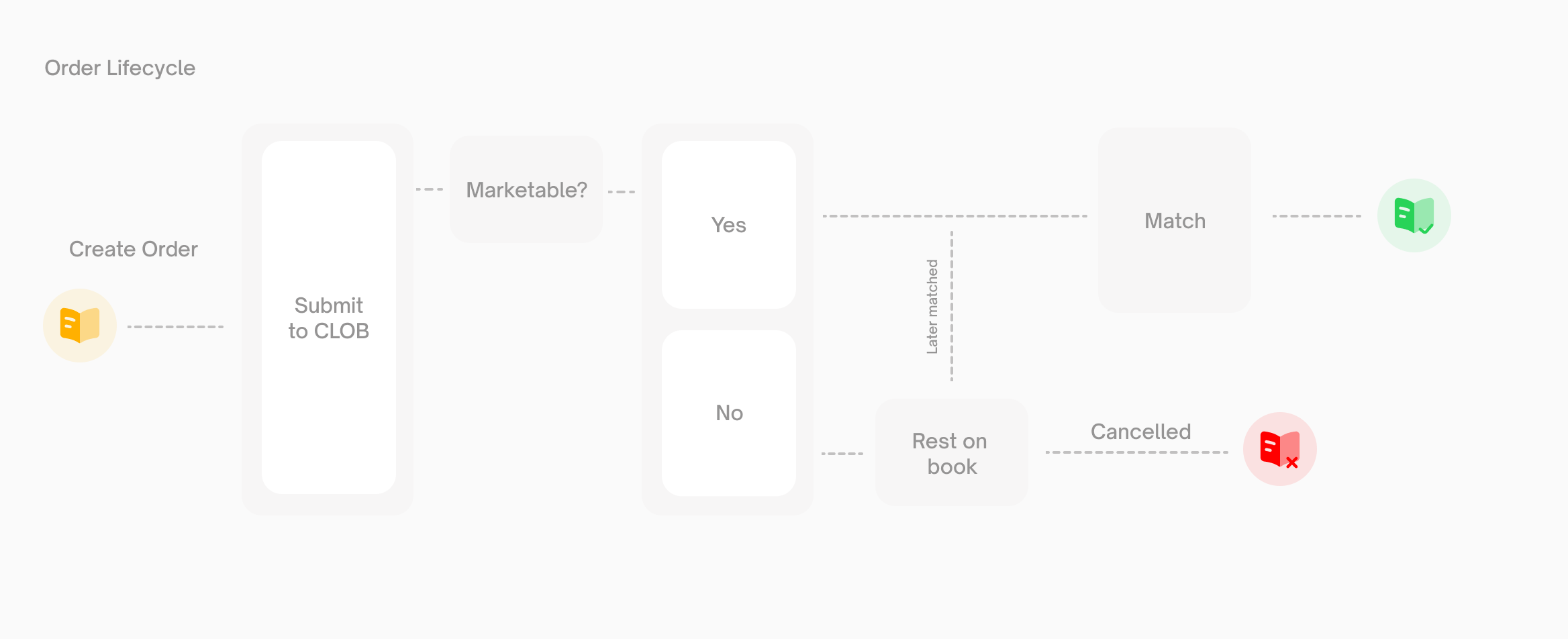
Submit to CLOB
The signed order is submitted to the Central Limit Order Book (CLOB) operator. The operator validates:
- Signature is valid
- You have sufficient balance
- You have set the required allowances
- Price meets minimum tick size requirements
3
Match or Rest
If the order is marketable (your buy price ≥ lowest ask, or your sell price ≤ highest bid), it matches against resting orders. Some markets apply a short taker delay before matching:
- Taker delay: used on selected crypto and finance up/down markets. The order is held for 250 ms, then validation runs again and the order is matched or placed on the book. The API waits for this hold and returns the final order result. To check a specific market, call the public CLOB endpoint
GET https://api.copilot.markets/clob/clob-markets/{condition_id}and look foritode: true. - Sports/game delay: enabled on configured sports markets around live game conditions. The order waits for the market’s configured delay window before matching.
- Another order matches against it
- You cancel it
- It expires (GTD orders only)
4
Settlement
When orders match, the operator submits the trade to the blockchain. The Exchange contract:
- Verifies both signatures
- Transfers tokens from seller to buyer
- Transfers pUSD from buyer to seller
5
Confirmation
The trade achieves finality on Polygon. Your token balances update and the trade appears in your history.
Order Statuses
When you place an order, it receives one of these statuses:Trade Statuses
After matching, trades progress through these statuses:Maker vs Taker
Price improvement always benefits the taker. If you place a buy order at
$0.55 and it matches against a resting sell at $0.52, you pay $0.52.
Cancellation
You can cancel orders at any time before they’re matched via the CLOB API, except while a marketable order is in a pending delay window. Partial fills cannot be cancelled: only the unfilled portion of an order can be cancelled.Requirements
Before placing orders, ensure:Order size is limited by your available balance minus any amounts reserved by existing open orders.
Next Steps
Resolution
Learn how markets are resolved and winning tokens redeemed.
Trading Guide
Start placing orders with our step-by-step guide.